
Summary note: This is a summary of the GitHub repository for the open-source project Agent Hive (ericwang915/agent-hive, created November 17, 2026) — not a reprint of the original. The project was presented on X by @jaywcjlove on November 21. Original link: https://github.com/ericwang915/agent-hive
Note: At the time of checking (November 22, ~09:05), x.com returned HTTP 403 across the site, so @jaywcjlove’s original post could not be opened; details here follow the GitHub repository README, and figures are the author’s own claims, not independently verified. The project is very new (21 stars, 75 commits, 15 releases at the time of checking), and features reflect the repository’s current state.
Anyone running several coding agents at once knows the annoyance: terminal windows to switch between, and keeping track of which agent is waiting on you, which one finished, and which one is stuck — all by hand. Agent Hive, an open-source project created on November 17, wants to pull all of that into one Mac app: a “Queen” hands out the work, and every agent is a bee, each working in its own folder.
One bee is one agent
Agent Hive supports Claude Code, Codex, Gemini CLI, Antigravity (agy), DeepSeek Harness (dsh), Cursor Agent, or any command that takes a prompt. Each bee has a name, a face, and a job, and works in its own folder; you can talk to it, put it on a schedule, chain it into a relay, or pull it into a group and let Queen coordinate.
It uses the CLIs and logins you already have, including a Claude or ChatGPT subscription, and ships no API keys, stores none, has no account and no server of its own. Install with one command that downloads the latest release into /Applications, or via Homebrew (brew install --cask ericwang915/tap/agent-hive), or run from source (git clone, then npm install && npm start). Requirements: macOS 12 or later, at least one agent CLI on your PATH, and git. The app itself is built with Electron, MIT-licensed, signed and notarized by Apple, with no telemetry — the only request it makes on its own is a check for new releases on GitHub.
Queen dispatches; relay teams build in review
Two collaboration patterns do the work:
- Queen leads a group. Pull bees into a group and tell Queen what you want; she picks the right bees, dispatches the work, waits for the results, and sums them up. She only wakes the bees she needs, and asks before hatching new ones. A group works without Queen too:
@mentiona bee and it starts right away; leave the name out and a small, cheap model picks the bee the message is for, so the others stay asleep; a bee can hand part of the job to another by@mentioningit, for at most three hops. - Relay teams. Up to six bees share a folder and pass work down the line: a reviewer can send its findings back to the writer until it approves, for at most three rounds. A handoff can carry a condition, written in one sentence under “Only when” (“the conversion rate is below 5%”, “tests failed”); when the bee before finishes, one small model call checks the sentence against its reply — if it does not hold, the next bee is not started, and the chat says what was found. Bees on the same step run in parallel, each in its own git worktree, and a final bee merges their results. Teams are built by dragging: drop a bee onto the one it should follow to chain it; drop two bees on the same one and they work in parallel; drag a bee onto a second one and it waits for both and merges their work.
Each bee has its own chat window (full conversation, streaming replies, inline diffs, nested sub-agents, cost per round), and the Changes tab shows the diff with commit, discard, push, and open-pull-request actions. A Files page lists every PDF, deck, chart, and link the bees produced, by bee and project.
Schedules, event triggers, and saving tokens
- Schedules. Once, daily, weekdays, weekends, weekly, monthly, or every N minutes. Runs missed while the Mac slept are caught up the same day, and a daily budget stops automatic runs once it is used up.
- Event triggers. Instead of a time, a bee can wait for something to happen: new commits on a branch (in its folder or on the remote), a GitHub event (new pull request, new comment, CI failure, through the
ghCLI), or another bee finishing or failing. What happened is attached to its prompt; its own commits and comments do not wake it, and a cooldown keeps bursts to one run. - Token savers. The author’s claim: sessions are compacted before they get expensive, scheduled runs start fresh, and unused tools and MCP servers are left out. In a measured three-round task, a bee carried about 30% less context per round than plain
claude -pon the same machine with the same setup (29k against 44k tokens). That figure is the author’s own measurement, not independently verified. - Memory and skills. Overnight, two helper bees work: Dreamer keeps the long-term memory, and Gardener turns the day’s conversations into reusable skills. New sessions start with both.
- The rest. Sleep-safe (running bees stop when the lid closes and pick up where they left off when it opens, or when the app restarts); permissions can be approved per action in the app, auto-accept edits, allow everything, or plan first and change nothing; a Claude Code bee can open “Use my Chrome” and work in the Chrome you are signed in to, via the Claude in Chrome extension; a context meter,
/compactto summarize on the spot,/newto start over; cost and tokens per round, with a daily budget.
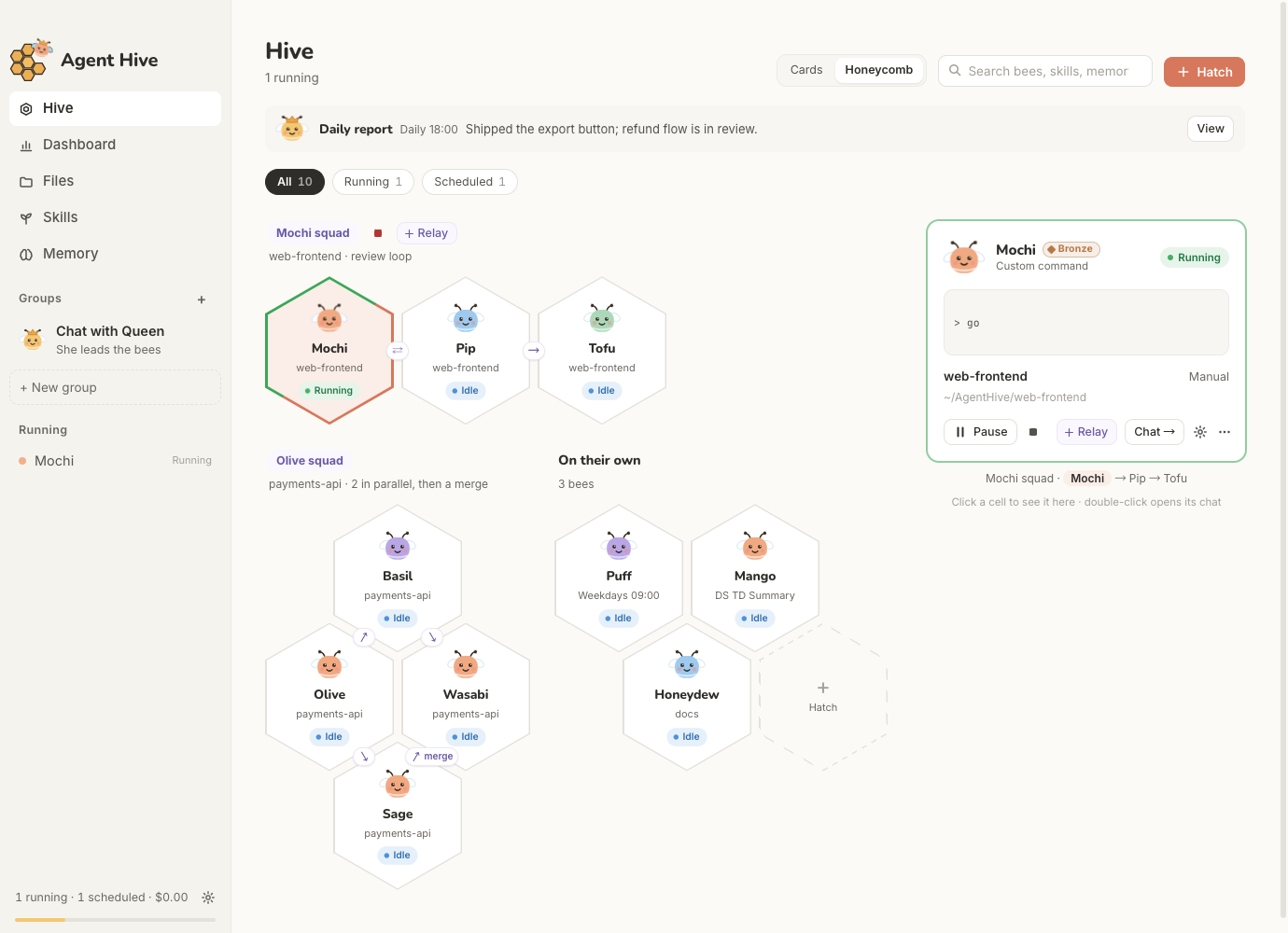 Image credit: Agent Hive GitHub repository README
Relation to similar tools — and the caveats
Multi-agent control rooms are bunching up right now: GridHive (a control room in the browser, npx gridhive), HiveTerm, and HIVE (hiv3.dev) all do something similar. Agent Hive’s difference is that it is a free, open-source, native Mac app, with Queen dispatch and relay review loops as its headline features rather than just split panes.
Its current state should be stated plainly: the repository was created on November 17, and at the time of checking it had 21 stars and zero forks — a very early personal project; macOS only, with no Windows or Linux version; the 30% token saving is the author’s self-measured figure; and as an Electron app, its long-term maintenance and stability are still to be proven. It fits someone happy to try it on a side project first — not something to drop straight into a critical production workflow.
Written by