
Summary note: This post summarizes BeevR’s article “Terminal AI Coding Agents 2026: Claude Code, Codex, Aider” (updated November 24, 2026), not a reprint. Original link: https://beevr.ai/blog/terminal-ai-coding-agents
Note: At check time (around 09:00 on November 25), x.com returned HTTP 403 across the site, so related discussion posts could not be opened. Details, versions, and prices here follow BeevR’s article; BeevR says each tool was checked against its own docs, GitHub repo, or pricing page on November 24, 2026, and the figures have not been independently verified.
Terminal AI coding agents have moved from novelty to team standard: they run in your shell, read the repo, edit files, run tests, and commit, without an IDE in the way. BeevR’s roundup, updated November 24, compares the ten terminal agents that are still maintained — versions, licenses, prices, commit attribution, sandboxing, and permissions, all checked against each vendor’s official docs, GitHub repo, or pricing page. The conclusion is blunt: the things that matter most in selection are not the feature list, but whether commits carry attribution, how strict the sandbox is, and whether the same rules apply in the terminal, the desktop app, and the cloud at once.
Ten terminal agents at a glance
Ten CLIs are worth shortlisting, in three groups: model-vendor CLIs (Anthropic, OpenAI, Google, AWS), IDE-vendor CLIs (GitHub, Cursor), and open-source tools (Aider, OpenCode, Goose, Cline).
| Agent | Install (one option) | License | Latest version seen | Models |
|---|---|---|---|---|
| Claude Code | curl -fsSL https://claude.ai/install.sh | bash |
Proprietary (public repo) | v2.1.331, Nov 23, 2026 | Claude; default Opus 5.5 on most plans |
| OpenAI Codex CLI | npm install -g @openai/codex |
Apache-2.0 | 0.172.0, Nov 24, 2026 | GPT-6.1 Sol, GPT-6.2 Sol, GPT-6 Luna |
| GitHub Copilot CLI | npm install -g @github/copilot |
Proprietary | v1.0.114, Nov 18, 2026 | Multi-vendor via Copilot, or your own key |
| Gemini CLI | npm install -g @google/gemini-cli |
Apache-2.0 | v0.71.1, Nov 24, 2026 | Gemini (paid licenses and API keys only) |
| Kiro CLI (AWS) | curl -fsSL https://cli.kiro.dev/install | bash |
Closed source | Not stated | Kiro credit-based models |
| Cursor CLI | curl https://cursor.com/install -fsS | bash |
Not stated | Not stated | Cursor’s model menu |
| Aider | python -m pip install aider-install && aider-install |
Apache-2.0 | 0.86.2, Feb 12, 2026 | Any provider, your own key |
| OpenCode | curl -fsSL https://opencode.ai/v2/install | bash |
MIT | v1.19.6, Nov 17, 2026 (GitHub) | Any provider, or OpenCode Go |
| Goose | Install script from aaif-goose/goose releases |
Apache-2.0 | v1.60.2, Nov 20, 2026 | 85+ providers, local models |
| Cline CLI | npm i -g cline |
Apache-2.0 | 3.0.75, Nov 21, 2026 | Your key, Cline Provider or ClinePass |
Two changes worth noting: Aider still works and is widely used, but its release pace has slowed — the last PyPI release was February 2026. Factory’s Droid CLI and Warp’s Agent CLI also exist, but BeevR says it could not confirm enough detail on them to compare fairly, so they are left out.
Who signs their commits: only three do it by default
An agent that touches git directly raises a real question: who wrote this commit? BeevR defines “provenance” as being able to tell, from git alone, that an AI agent produced a change, which model it was, and ideally which session. That matters in three places: review (reviewers treat agent-written diffs differently, with more attention to tests, dependency changes, and edge cases), audit (if an auditor or customer asks how AI-generated code is identified and reviewed, a trailer in every commit is cheap evidence), and incidents (when something breaks, a session link lets you see the prompt and tool calls that produced the bad change).
Only three tools mark AI commits out of the box:
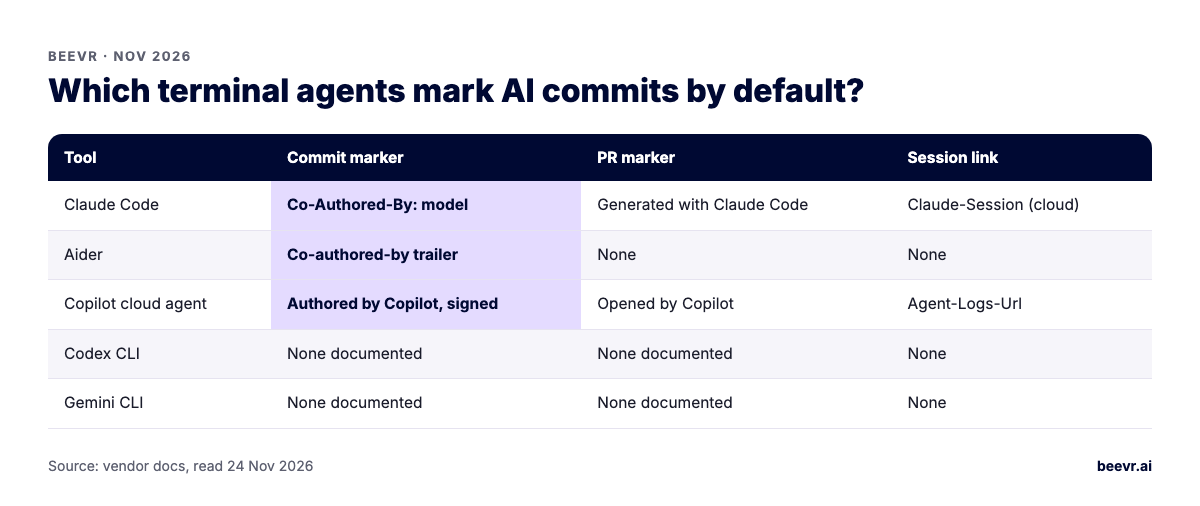 Image source: Illustration from BeevR’s article
- Claude Code: adds a
Co-Authored-Bytrailer naming the model in use by default, plus a “Generated with Claude Code” line in PR descriptions; cloud and Remote Control sessions also get aClaude-Sessiontrailer and link by default. Theattributionsettings object controls commit, PR, and session URL separately, and"attribution": falsehides all of them. If attribution is set in managed settings, developers cannot override it with their own instructions — which is what an engineering manager wants. For audit, Claude Code exports OpenTelemetry metrics such as commit and PR counts, with prompt text redacted unless you opt in. - Aider: commits every edit it makes, and
--attribute-co-authored-byis on by default. You can also append “(aider)” to the git author or committer name, or prefix commit messages with “aider: “. One catch: Aider skips pre-commit hooks unless you pass--git-commit-verify, so turn that on if your hooks enforce linting or secret scanning. - GitHub Copilot cloud agent: the strongest example of platform provenance. Commits are authored by Copilot with the person who assigned the task as co-author; since April 2026 every agent commit is signed, so it works with “Require signed commits”; and an
Agent-Logs-Urltrailer points to the session log. Note this is the cloud agent’s behavior — the local Copilot CLI documents no equivalent trailer. - Codex CLI and Gemini CLI: the current configuration references document no commit-attribution key. Older docs referenced one, and some blogs say Codex adds a co-author trailer by default, but BeevR says it could not confirm that on a current primary source. If you need attribution from Codex today, add a
prepare-commit-msghook that appends a trailer when the agent’s environment variable is present.
One more warning: commit trailers can be removed or forged by anyone with push rights, so they are a signal, not proof. Stronger provenance comes from signed commits, branch protection, and keeping session logs.
Pricing: seats are $19–$30; tokens are the real bill
A team seat with a vendor CLI costs about $19–$30 per user per month on monthly billing, before usage-based extras. Open-source CLIs are free, but you pay the model provider per token. Heavy agent users often need premium seats at $100–$125 per month.
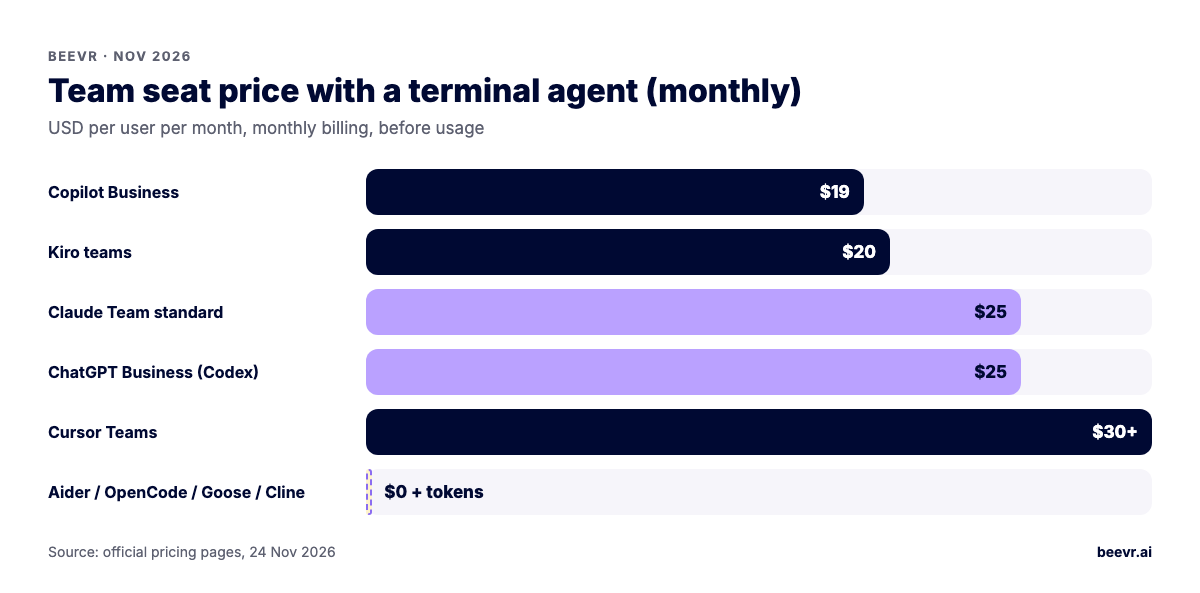 Image source: Chart from BeevR’s article
| Tool | Individual | Team / business seat | Pay-per-token option |
|---|---|---|---|
| Claude Code | Pro $20/mo; Max $100; Ultra $200 (Free plan excludes it) | Team standard $25/mo ($20 annual); premium $125 ($100 annual); Enterprise $20/seat + API-rate usage | Anthropic API key, Bedrock, Google Cloud, Microsoft Foundry |
| Codex CLI | Plus $20/mo; Pro $100–$500 | Business $25/mo ($20 annual) | OpenAI API key (no cloud features) |
| Copilot CLI | Free; Pro $10; Pro+ $39; Max $100 | Business $19/seat; Enterprise $39/seat | Overage at $0.01 per AI credit |
| Kiro CLI | Free 50 credits; Pro $20 (1,000 credits) | $20/seat with 500 pooled credits | Extra credits |
| Cursor CLI | Free; Plus $8 (Grok only); Premium $30 | Teams $30+/user | Usage billed on top |
| Aider, OpenCode, Goose, Cline | Free software | Free software | Your provider’s token prices |
Prices come from claude.com, Codex, GitHub Copilot, Kiro, and Cursor pricing pages, all read November 24, 2026. BeevR’s warning: seat prices are the easy part. Agent loops burn tokens quickly, which is why it recommends per-team budgets from week one.
Sandboxing and permissions: who blocks the network by default, who leaves it wide open
The vendor CLIs now ship OS-level sandboxes: Seatbelt on macOS and bubblewrap on Linux for Claude Code and Codex, plus Docker, Podman, or gVisor options in Gemini CLI. The policies differ considerably:
- Claude Code: permission modes from
defaultandplantoautoandbypassPermissions; admins can disable bypass withpermissions.disableBypassPermissionsMode. Traffic routes through a proxy with an empty domain allow-list. Note: native Windows is not sandboxed. - Codex CLI: blocks network access by default.
sandbox_modeisread-only,workspace-write(default), ordanger-full-access;approval_policycontrols prompts. Admins can enforce settings withrequirements.toml. - Gemini CLI: opt-in with
--sandbox; it switches on automatically in YOLO mode, andsecurity.disableYoloModelets you ban YOLO. - Copilot CLI: manual approval by default,
--allow-tool/--deny-toolrules (deny wins),/sandbox enablelocally, orcopilot --cloudto run in a GitHub-hosted environment. - Cline CLI: auto-approve is on by default, with no built-in command allow/deny list, so its docs suggest a
PreToolUsehook to block commands. - Aider: documents no sandbox.
A sandbox limits what a confused agent can damage. It does not stop the agent from writing insecure code — which is why review and scanning still matter.
Three renames and one shutdown this year
- Gemini CLI: Google moved free and Google AI Pro/Ultra users from Gemini CLI to the Antigravity CLI on June 18, 2026; Gemini CLI now serves paid Code Assist licenses and API keys. The open-source repo is still active, with weekly releases. Google also notes that Gemini CLI “has not been optimized” for Gemini 4 Argon.
- Antigravity CLI (
agy): free for individuals with a weekly quota; Gemini Enterprise seats start at $30 per month. BeevR says it could not confirm the exact install command on Google’s page, so it does not print one. - Amazon Q Developer CLI → Kiro CLI: the repo README says it “is now available as Kiro CLI, a closed-source product.” The old repo gets critical security fixes only.
- Jules: Google’s asynchronous agent is read-only since November 11 and shuts down on December 31, 2026.
- Windsurf → Devin Desktop: Windsurf is now Devin Desktop.
Beyond the terminal: desktop apps for parallel sessions
Most vendors now pair a CLI with a desktop app that runs several agent sessions in parallel: Cursor, Devin Desktop (formerly Windsurf), Kiro IDE, Google Antigravity, and the Code tab in Claude Desktop. The CLI handles scripts and CI; the desktop app handles parallel, reviewable work on git worktrees.
- Claude Code desktop runs parallel sessions on git worktrees, locally, in the cloud, or over SSH.
- Cursor pairs its editor with the Cursor CLI and cloud agents that open PRs.
- Devin Desktop: the Teams plan is $80 per month per team with pooled credits.
- Kiro IDE shares one subscription with Kiro CLI and Kiro Web.
- Google Antigravity offers a desktop app, CLI, and IDE extensions.
For a team, the deciding question is not the editor. It is whether the same settings, permissions, and attribution rules apply in the IDE, the CLI, and the cloud. BeevR compares platforms on that basis in a separate piece.
Rollout advice: set the rules before the first install
BeevR’s rollout advice is specific: pick one CLI, set attribution and permissions in managed settings before the first developer installs it, require signed commits and PR review on protected branches, and send telemetry to your own collector. That is about a week of platform work — and it is much harder to add after hundreds of unmarked commits. Choose by model access and data terms, not features: if your contracts require a cloud-provider agreement, pick a CLI that runs against Bedrock, Vertex, or Foundry.
Written by